Your agents need a control room.
Torc runs your coding agents in real terminal panes and watches all of them at once. See what's working, what's finished, and what's blocked by you — without cycling through tabs.
Early access. No spam, one email when it's ready.
macOS · Apple siliconApache-2.0 on GitHub
01Why
Parallel agents made me the bottleneck.
I started running four or five coding agents at once — one per repo, sometimes several on the same repo.
Getting agents to work in parallel was never the hard part. Keeping track of them was.
One would finish and sit idle for ten minutes before I noticed. Another would be blocked on a permission prompt, just waiting. I'd cycle through terminal tabs trying to remember what was running where, and cost and token usage were invisible until I went looking.
Parallel agents should mean more throughput. Instead the coordination overhead ate the gains, because I had turned myself into a human polling loop — and a bad one, polling at random intervals and missing things.
So I built Torc.
02Mission Control
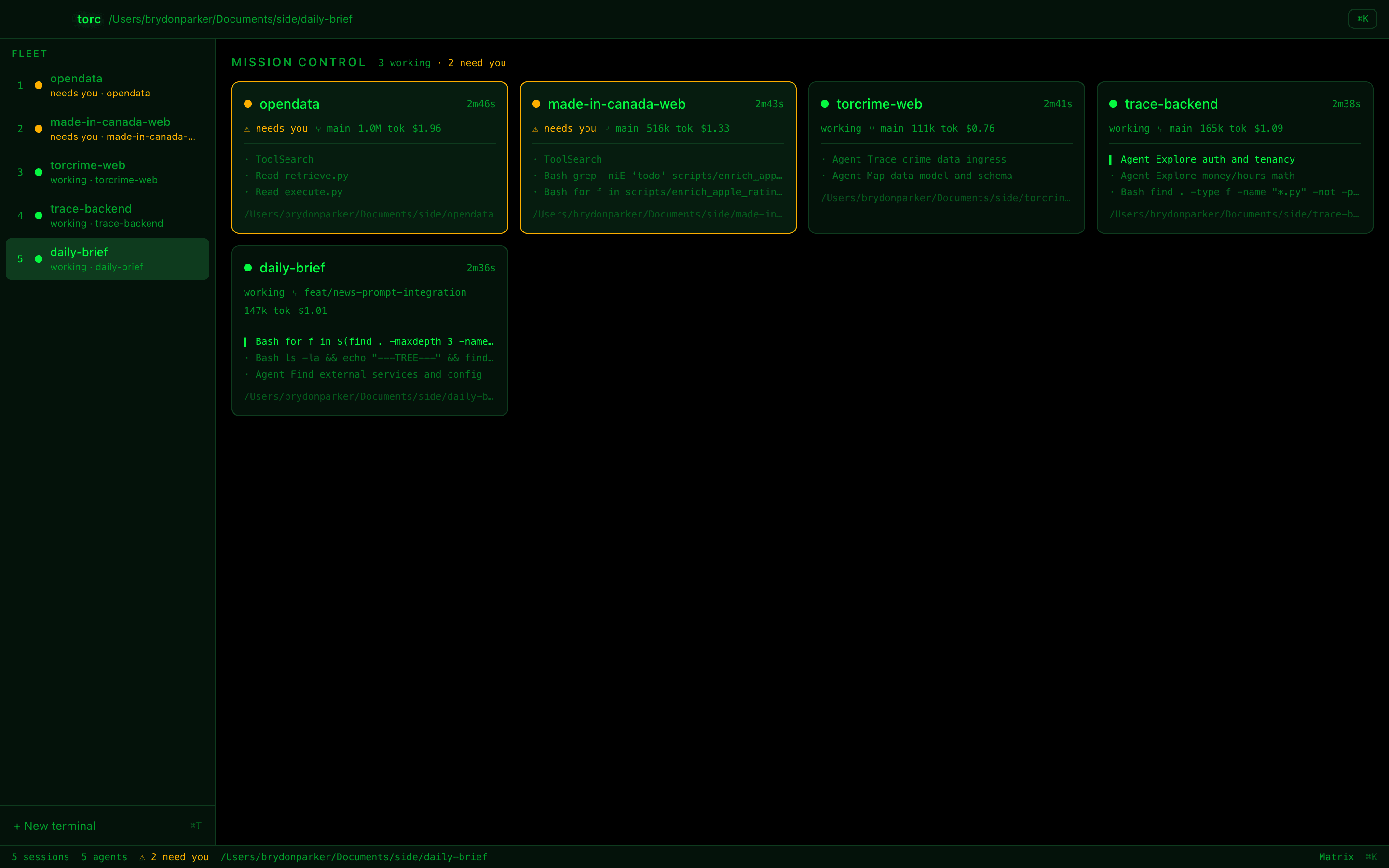
Five agents. One glance.
Torc knows when an agent is working, idle, or waiting on you — and sorts the ones that need you to the front. Every card carries the live tool feed, git branch, token count and running cost.
- agents
- 5
- working
- 3
- need you
- 2
Jump straight to the next agent that needs you. It's the shortcut I use most.
03Real panes
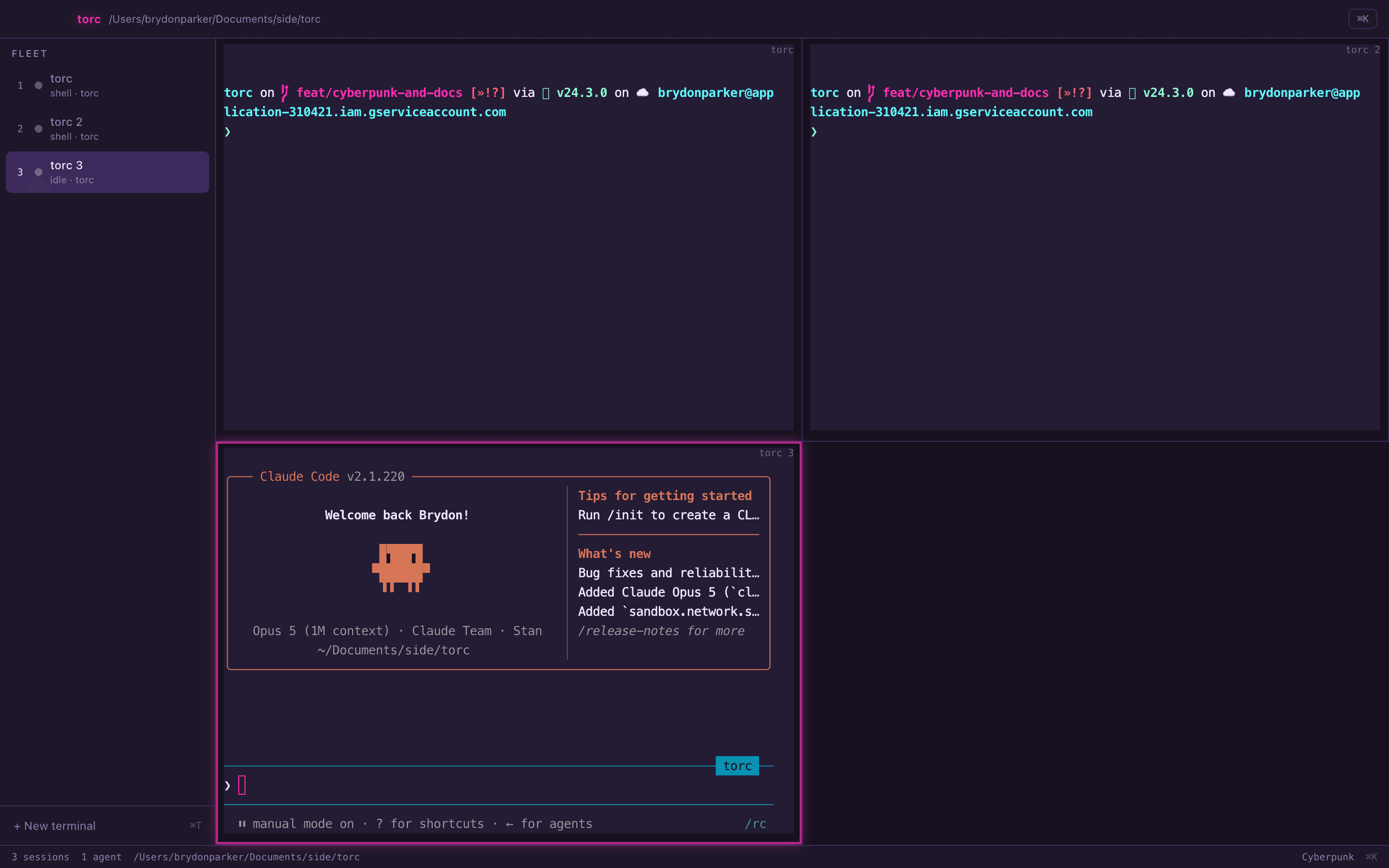
Still a terminal.
Torc doesn't ask you to launch work from a dashboard and come back later. The agents run in real PTYs with xterm.js on top, so you work in them exactly like you do today.
Torc sits above your terminal, not between you and it.
04Agents
Works with the agents you already run.
Every pane is a real terminal, so any CLI works in Torc today — including a plain shell. The live status, token and cost telemetry is built on each agent's own structured surfaces, which means it arrives per-agent as the adapters land.
- Claude CodeFull monitoring
- CodexRuns today · adapter next
- OpenCodeRuns today · adapter next
- Gemini CLIRuns today · adapter next
- aiderRuns today · adapter next
- zsh · bashRuns today
“Runs today” means the agent behaves in a Torc pane exactly as it does in your terminal — splits, ⌘K and session restore all apply. It just doesn't report status, tokens or cost into the fleet view yet.
05Command palette
The terminal finally has ⌘K.
Linear proved a command palette can be the interface rather than a shortcut to it. Torc's palette leads with whichever view you're not in, numbers every agent, and keeps the shortcuts worth knowing along the bottom — so it's also where you learn the keyboard.
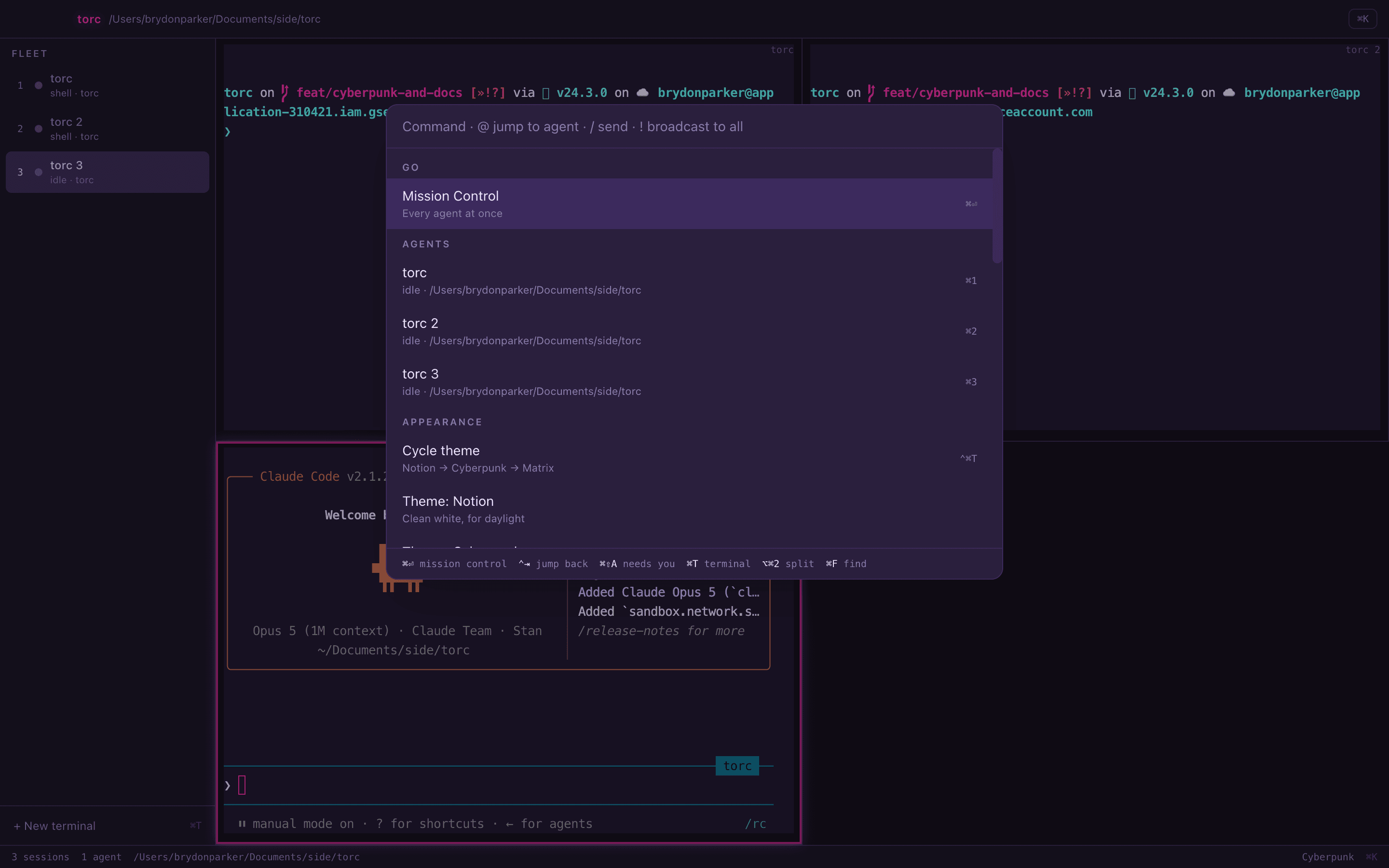
- @Jump
- Move to any agent by name, without hunting through panes.
- /Command
- Send a slash command straight to the focused agent.
- !Broadcast
- Send one prompt to every agent in the fleet at once.
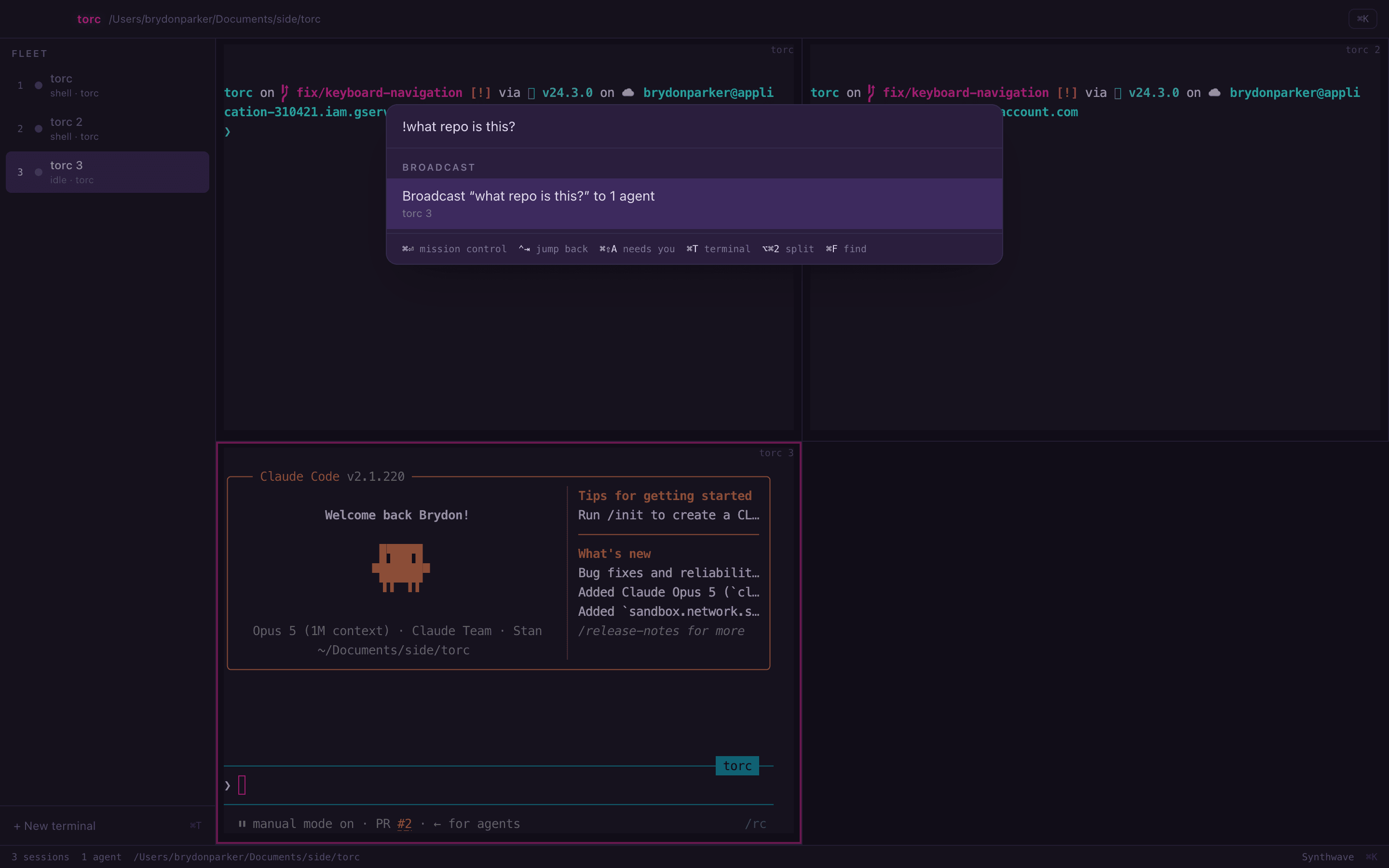
Try it here, too — ⌥⌘Tcycles this page's theme exactly as it cycles the app's.
06Attention
Go do something else.
The moment an agent asks for permission, Torc badges the dock and sends a native notification. Click it and you're in the pane that needs you.
No polling. No checking. No agent sitting blocked for ten minutes.
- Native notifications
- Fired from Claude Code's hooks, so they land the instant the agent blocks — not on a poll.
- Dock badge
- A running count of how many agents are waiting on you, visible from any app.
- Sessions survive a restart
- Layout and theme come back, and agents resume with their conversation and scrollback intact.
07Themes
Your fleet. Your terminal.
This is where the day goes, so it should be worth looking at. Three themes, and ⌥⌘T cycles them. Pick one below — the site is running the same palettes as the app.
⌥⌘T cycles them, in the app and here.
08Architecture
No screen scraping.
Monitoring a terminal agent looks like it should mean parsing its output. It doesn't. A modern agent already exposes structured surfaces for all of it, so Torc reads those and leaves the terminal responsible for exactly two things: pixels and keystrokes. That's also why support arrives per-agent: each one needs its surfaces mapped once.
The agent
- Hooks
- The authoritative state edges — working, needs-input, turn complete, exited — delivered the moment they happen.
- Session transcript
- Detail only: the agent's own title for the conversation, tool arguments, tokens, cost, git branch.
- Session registry
- Polled every two seconds to reconcile, catching anything missed and discovering agents you started by hand.
torc
- state
- attention
- telemetry
- cost
Real terminal
Responsible for exactly two things: pixels and keystrokes.
Torc never edits your ~/.claude/settings.json — per-session hooks go in via claude --settings pointing at a generated file under ~/.torc/, and everything there is regenerated on launch and safe to delete.
09Get it
Run your fleet.
Torc is Apache-2.0 and works today. Clone it and build the app:
git clone https://github.com/parker84/torc.gitcd torcnpm installnpm run distWant the signed, notarized build instead? Leave your email and you'll get one message when it's ready.
Early access. No spam, one email when it's ready.
Torc is early. It needs macOS on Apple silicon and Node 20+, plus Claude Code installed and signed in if you want the full fleet telemetry. The build isn't notarized yet, so the first launch needs a right-click → Open.
10FAQ
Questions.
What is Torc?
Torc is a fleet console for CLI coding agents — a terminal-first workspace for running many coding agents at once. It shows every agent's status, current tool call, git branch, token count and cost in one view, flags the moment one is blocked waiting on you, and is driven from a ⌘K command palette.
How is Torc different from Conductor, Crystal, or Vibe Kanban?
Those are dashboard-first: you launch work, leave, and come back to review diffs. Torc is terminal-first — the fleet view is a layer over real terminal panes, not a replacement for them, so you work inside it rather than beside it. It's also driven by a ⌘K palette rather than mouse-and-panel navigation.
Is Torc a code editor?
No. Editing stays in VS Code or Cursor. Torc is the layer above the terminal that the multi-agent workflow is missing — running agents, monitoring them, and getting your attention when one needs it.
Which agents does Torc support?
Any CLI runs in a Torc pane today, because the panes are real PTYs — Claude Code, Codex, OpenCode, Gemini CLI, aider, or a plain shell. Deep monitoring (live status, tokens, cost and needs-you flags) requires mapping that agent's structured surfaces once, and Claude Code is wired up so far. Adapters for Codex, OpenCode, Gemini CLI and aider are ticketed and next.
How does Torc know when an agent is blocked?
It reads the agent's structured surfaces rather than scraping the terminal. Hooks provide instant state transitions, the session transcript supplies detail like tokens and cost, and the session registry is polled every two seconds to reconcile. No terminal output is ever parsed for state.
Does Torc work with agents I started myself?
Yes. An agent you start by hand in any Torc terminal is picked up automatically within a couple of seconds, with the same monitoring as one Torc launched.
What do I need to run Torc?
macOS on Apple silicon and Node 20+. For the full fleet telemetry you also want Claude Code installed and signed in, since that's the agent wired up for deep monitoring today — other CLIs still run in the panes.
Is Torc free and open source?
Yes — Torc is Apache-2.0 licensed and the source is on GitHub. You can clone it and build the app today.
Does Torc change my Claude Code settings?
No. Torc never edits `~/.claude/settings.json`. Per-session hooks are injected via `claude --settings` pointing at a generated file under `~/.torc/`, and everything in that directory is regenerated on launch and safe to delete.